So you took the plunge and set up a website. If you haven’t already, the first thing you should be wondering to yourself is “Why can’t people find my website on Google?”—you’re not alone. Many retirees start blogs, hobby sites, or small business websites only to discover that simply publishing a page doesn’t mean visitors will magically appear.
That’s where basic search engine optimization comes in.
Don’t worry—this guide here is written for real people, not tech experts. You don’t need to code, chase trends, or spend hours learning complicated tools or processes. With a few smart writing principles and consistent habits, you can dramatically improve how search engines see—and rank your website. Let’s get into it.
So before we delve into SEO, let’s talk about the core SEO principles you need to know before we get into the SEO basics.
Content is KING!
The first thing you need to understand is Content is King! Whatever topic that you’re writing about, you need to follow some best writing practices to ensure your content makes it to the top or as close to the top in the search engine ranking as possible. This is accomplished by writing good content. So what makes up good content? Lets look:
Evergreen Content
Evergreen content is content that stays useful, relevant, and valuable for a long time—months or even years after you publish it. Just like evergreen trees that stay green all year, evergreen content doesn’t go out of date quickly. This type of content is one of the most powerful tools in basic search engine optimization.
Evergreen content answers questions people will always ask like:
- “How do I…?”
- “What is…?”
- “Beginner’s guide to…”
- “Tips for…”
Writing good evergreen content means your content doesn’t expire
EEAT: Experience, Expertise, Authoritativeness, and Trustworthiness
Google evaluates websites using a framework called EEAT, which stands for:
1. Experience: Have you actually lived and experienced what you’re writing about? Your real-life experiences have incredible value for SEO.
2. Expertise: Do you clearly understand your topic? You don’t need a fancy degree—just write with: Accurate information, clear explanations and honest insights.
3. Authoritativeness: Are you seen as a reliable source? You build authority by: writing consistently, covering topics thoroughly, and staying focused on one main subject area.
4. Trustworthiness: Can readers trust you? Trust comes from: clear contact information, Honest writing, no exaggerated claims and helpful, transparent content.
Good basic search engine optimization always aligns with EEAT. These 4 topics are your core building blocks for high-ranking content with the search engines.
The Content Moat?
A content moat is a collection of high-quality, helpful content that protects your website from competitors and makes it hard for others to outrank you. A content moat means:
- You cover a topic better than anyone else
- You answer every important question
- Your site becomes the go-to resource
Instead of one article trying to rank, you build many related articles that support each other. This is a powerful strategy in basic search engine optimization. For example, let’s say your website is about basic search engine optimization. Instead of writing just one article, you create a group of articles like the examples below:
- What is basic search engine optimization?
- Organic SEO vs paid SEO
- How long SEO takes to work
- Evergreen content explained
- Keyword research for beginners
- WordPress SEO plugins
- SEO mistakes beginners should avoid
Why is the Content Moat Is So Powerful? It’s easy to explain this, a content moat will help you:
- Rank higher
- Stay ranked longer
- Build authority and trust (EEAT)
- Attract steady organic traffic
- Compete with bigger websites
Most websites fail because they publish:
- Random topics
- One-off articles
- Thin content
A content moat will help you solve that failure issue.
Does this make sense? For all the SEO tricks you can do tweaking your SEO, if your content is poorly written, you’re not going to benefit from SEO in the long run. They’re not kidding when they say “Content is King” This is your core building block.
What Is Basic Search Engine Optimization?
Basic search engine optimization (often shortened to SEO) is the process of helping search engines like Google understand what your website is about—so they can show it to the right people. Think of Google as a massive digital library. SEO is how you label your book correctly so it gets placed on the right shelf. Good SEO helps:
- The right people find your site
- Your pages appear higher in search results
- Your content earn trust over time
What’s the best part about search engine optimization? Your best success will come from doing the basics well. This is called Organic Search Engine Optimization. And having said that, we can segue into our next section.
Why SEO Matters More Than Ever (Especially for Seniors)
I get it! You’re probably thinking: “I’m not running a big business, why does SEO matter to me?” Here’s the simple answer why:
- You have experience and wisdom that others don’t.
- You can create thoughtful, helpful content without rushing.
- Google values trust and expertise more than flashy tricks.
The fact is, us seniors often do better at SEO because Google now prioritizes quality, clarity, and credibility over gimmicks.
What Is The Difference Between Paid SEO And Organic SEO?
Okay, lets start with the one search engine optimization that cost’s you money.
Paid SEO usually refers to paid search advertising, such as Google Ads. These are the listings labeled “Ad” at the top of search results. You pay Google to show your website when someone searches for a specific keyword. How paid SEO works
- You choose keywords
- You bid on them
- You pay per click
- Your ad appears instantly
Your site shows immediately—but only as long as you keep paying. Once you stop paying Google, the traffic stops coming to your link.
Pros of Paid SEO
✅ Instant visibility
✅ Full control over keywords
✅ Good for promotions or sales
Cons of Paid SEO
❌ Can be expensive
❌ Traffic stops when payment stops
❌ Less trust from users (many skip ads)
Organic SEO (also called organic search engine optimization) means improving your website so it naturally appears in search results without paying Google. How organic SEO works is easy. Y ou build it into your content by:
- Writing helpful content (“content is king”)
- Keyword usage
- Page titles and descriptions
- Site speed and structure
- Using Trust and credibility (EEAT)
How to Start a WordPress Blog for Seniors: A Beginner-Friendly Guide to Sharing Your Voice Online
Pros of Organic SEO
✅ Free traffic
✅ Long-term results
✅ Builds trust and credibility
✅ Perfect for blogs, retirees, hobby sites
Cons of Organic SEO
❌ Takes time (weeks or months)
Let’s be very clear about Organic Search Engine Optimization. This means playing the long game. It’s not about instant results. I’ve had very niche exclusive content show up in Google search the first week or two it posted, but I can tell you from personal experience that was a rarity. It takes weeks or months before your content will show up in the search engines.
For most of us, using organic SEO is the better choice.
- We have the time and experience
- We’re not trying to outspend big companies
- Google values helpful, trustworthy content
- And we can grow steadily without pressure
Organic SEO usually takes 3 to 6 months to show meaningful improvements. However, your strongest results often appear after 6 to 12 months.
Okay, enough blathering. Are you ready to get into Search Engine Optimization For Beginners? LET’S DO IT!
The Top WordPress SEO Plugins
Alright.. If you’re anything like me, I get all excited over a new website. One of the first things I do is install a SEO plugin to use. I use Rank Math. I’ve used All In One AIOSEO in the past and have played with Yoast SEO a bit, but for me, my preference is with Rank Math. I feel it’s the easiest to use and gives me the best value of the three plugins in my experience.
Any of these Search Engine Optimization plugins are going to make your search engine optimization (SEO) efforts much easier. Once you have this installed into your WordPress site, you’re going to need to head over to Google Analytics and set up your website so you can track your website performance metrics.
1. Rank Math
A newer but very powerful SEO plugin that offers a lot for free. Rank Math lets you optimize multiple keywords per post, integrates Google Trends, and includes tools to handle redirects and errors—all from within WordPress. It’s a favorite for people who want many features without paying right away.
- Best for: Users who want advanced tools in the free version
- Pros: Multiple keyword support, lots of helpful features
- Cons: Interface might feel a bit detailed at first
One of the most beginner-friendly SEO plugins available. It walks you through a simple setup and helps you configure your site easily—even if you’re new to SEO. AIOSEO can help you edit titles, meta descriptions, generate sitemaps, and even track how your keywords are performing over time. A lite version is free, and there are premium options if you want more advanced features.
- Best for: Beginners and easy setup
- Pros: Simple interface, search console integration, SEO checklists
- Cons: More advanced features require paid upgrade
3. Yoast SEO
Probably the most popular SEO plugin in the WordPress community. Yoast offers clear, real-time suggestions as you write your posts—such as where to place your keyword, how readable your content is, and whether your meta description is the right length. The free version has plenty of basics, and an optional premium upgrade adds more tools.
- Best for: Beginners who like guidance
- Pros: Color-coded SEO feedback, readability checks
- Cons: Some advanced features behind a paywall

Keywords: The Foundation of Basic Search Engine Optimization
Keywords are the words and phrases people type into search engines looking for specific information. For example: “basic search engine optimization”, “SEO for beginners”, or “how to improve website rankings”. For your content, you’ll need to find a focus keyword. The goal with a focus keyword is to match real searches with helpful content.
There are two kinds of keywords. Let me break it down for you:
Short-Tail Keywords
Not gonna lie. Using short-tail keywords sucks. They’re just to broad to use.
- 1–2 words
- Very competitive
- Broad meaning
Examples:
- “SEO”
- “website”
- “marketing”
As you can probably guess, these are going to be the hardest to rank for, especially for a new website.
Long-Tail Keywords (Best for Seniors!)
Fortunately, we have long-tail keywords. These are much easier to find, create, and use than the short-tail ones.
- Typically 3–6+ words
- Less competition
- And can be very specific
Examples:
- “basic search engine optimization for beginners”
- “SEO tips for small personal websites”
- “how seniors can learn SEO”
Long-tail keywords are your best friend. You’ll benefit from using these because:
They bring more targeted visitors
- They bring more targeted visitors
- Promote higher chances of ranking
- Provide readers who stay on your content longer
How to Find the Most Effective Keywords (No Tech Headaches)
You don’t need expensive software. Here are the easiest tools to do your keyword research.
- Google Autocomplete
- Start typing a phrase
- Notice the suggestions
- “People Also Ask” Boxes
- Scroll Google results
- See real questions people ask
- Related Searches
- Found at the bottom of Google pages
- Free Tools
- Google Keyword Planner
- Ubersuggest (free version)
- AnswerThePublic
When researching your keywords, look for keywords that:
- Match your topic
- Make sense naturally
- Have clear intent
Establishing Proper Keyword Density (Avoid Overdoing It)
Keyword density means how often your keyword appears in your content. What you want to do is avoid what is known as “keyword stuffing.” Too much and Google can penalize your post.
Safe Rule of Thumb
- 0.5%–1.5% of total words
- Use the keyword naturally
- Never force it

For a 1,500-word article:
- Mention “basic search engine optimization” about 8–15 times
You’re not limited to just your focus keyword, you can also use:
- Variations
- Synonyms
- Related phrases
Google is smart—it understands context.
Titles That Rank: Numbers, Power Words, and Limits
Your title is another one of the most important SEO elements for your article. One thing to keep in mind, is that your title should be less than 60 characters, but you can add a sub-title to it to enhance your title.
Best Practices for SEO Titles
- Include your focus keyword
- Use a number
- Add a power word
- Stay under 60 characters
Examples
- “7 Simple Steps to Master Basic Search Engine Optimization”
- “10 Proven Basic Search Engine Optimization Tips for Beginners”
Power words include:
- Simple
- Proven
- Essential
- Easy
- Practical
- Complete
Your title should promise value—clearly and honestly.
Meta Descriptions: Your Search Result Sales Pitch
A meta description is the short summary shown under your title in search results.
Meta Description Best Practices
- Max 160 characters
- Include your focus keyword
- Speak directly to the reader
- Encourage clicks
Example
“Learn basic search engine optimization with easy steps designed for beginners. Improve rankings, attract visitors, and build trust.”
In your SEO plugin you will find a section where you can add your description.
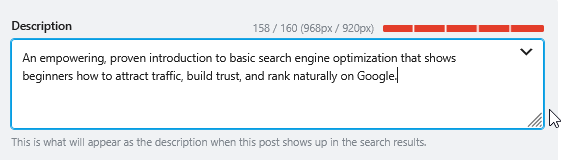
While meta descriptions don’t directly affect rankings, they do improve click-through rates—which helps SEO over time.
Readability: Writing for Humans First
Search engines reward content that’s easy to read.
Senior-Friendly Formatting Tips
- Short paragraphs (2–4 lines). Studies have shown that longer paragraphs, the reader looses interest and moves on.
- Clear headings
- Bullet points
- Simple language
- Plenty of white space
If it’s easy on the eyes, it’s good for SEO.
How Long Should a Blog Post Be?
Well, this really depends on your content. There’s no magic number—but we do have a few smart guidelines we can follow.
Recommended Word Counts
- Short posts: 600–800 words (limited reach)
- Standard posts: 1,000–1,500 words
- In-depth guides: 1,500–2,500 words (best for SEO)
For most websites, 1,200–2,500 words is ideal.
Why longer content works best:
- It answers more questions
- It keeps readers engaged longer
- It signals authority to search engines
Quality matters more than length—but again, content is king. Good thorough content usually wins.
If you feel your content is too long, think about how you can break that up into 2 or 3 related posts?
Final Thoughts: Search Engine Optization Is a Marathon, Not a Sprint
If you take one thing away from this guide, let it be this: Your experience matters. Your voice matters. And search engines want helpful content from real people.
What’s important is, you don’t need to master everything at once. All it takes to start is:
- One helpful article
- One clear keyword
- One well-written title
Over time, your website can grow into a trusted, visible resource.
That’s the true power of basic search engine optimization—and it’s absolutely within your reach.
Want more practical, experience-backed articles like this? Subscribe to our newsletter today and get expert senior-focused tips, strategies, website updates, and announcements delivered straight to your inbox.