If you’ve ever looked at a Facebook post filled with #hashtags and thought, “What are those really doing… and do I actually need them?” You’re not alone.
Many retirees and active adults starting a side business, passion project, or community page feel confused by hashtags. I’ve asked myself: Are they necessary? And will hashtags boost my views? Some people overuse them. Others avoid them completely. Both approaches can hurt reaching out to your tribe.
So today, let’s clear the air and see what #hashtags can do for your social media. In this guide, you’ll learn how to use hashtags the right way—without jargon, without hype, and without feeling like you need to be a social media expert.
This article is written from real-world use, not theory, and is designed to help you:
- Understand what hashtags actually do.
- Use them confidently on Facebook and other platforms, such as LinkedIn, X (Twitter), and Instagram.
- How to avoid common mistakes.
- And most importantly, getting more eyes on your posts (without spending advertising money)
Are you ready to start digging in?
What Are Hashtags, Really?
A hashtag is a word or phrase with a # symbol in front of it. In the image below, here is a example of a facebook post a local angler made about littering. She added 4 #hashtags (hi-lighted in blue) related to both fishing and cleaning up after yourself.

Other hashtag examples can be any topic or niche:
- #RetirementLife
- #GardeningTips
- #HowToUseHashtags
When you add a hashtag to a post, you’re essentially labeling your content so that social media platforms know what your post is about. Think of hashtags as: file folders, library labels, or better yet, signposts that guide people to your social media content.
They help platforms like Facebook, Instagram, and LinkedIn organize posts—and help people find topics they care about.
How Hashtags Work Behind the Scenes
Let me give you the simple version— When you publish a post with a hashtag, the platform scans the hashtag. The next thing it does is connect your post to others using the same hashtag. What this does is, it allows your content to appear in:
- Hashtag search results
- Topic feeds
- Suggested posts
That means people who don’t follow you yet, can still see your content. This is a big deal—especially if you’re building an audience later, or promoting a small business or hobby. Or maybe you just want to share advice, stories, or encouragement.
Why Do Hashtags Matter On Social Media?
Let’s be real and not kid ourselves, hashtags won’t magically make a bad post go viral—but if used correctly, they absolutely help the right people find you. Here’s what hashtags do for your social media:
- Increase Visibility
- Attract the Right Audience
- Help Your Social Media Platform Understand Your Content
Your post isn’t limited to just your friends or followers. Hashtags help Facebook for example show your content to:
- People searching that topic
- Users interested in similar content
- Groups and communities around that theme
It’s About Attracting the Right Audience: A good hashtag filters your audience. For example:
- #RetiredAndThriving → attracts retirees
- #BeginnerGardening → attracts newcomers, not experts
- #Over60Fitness → targets a very specific group
It Helps Your Social Media Platform Understand Your Content. Facebook’s algorithm needs clues right? Hashtags help to:
- Clarify your topic
- Reinforce your message
- Improve content categorization
All of these metrics helps your post travel further.
How to Use Hashtags the Right Way (Step-by-Step)
Now let’s get practical. If you’ve been wondering how to use hashtags without overthinking it, follow this simple process.
Step 1: Choose Hashtags That Match Your Message
Your hashtags should support what your post is about, not distract from it. Ask yourself:
- What is this post really about?
- Who would benefit from reading it?
- What would they search for?
Let’s look at a great example post: “Starting a vegetable garden after retirement has brought me so much joy.”
Some good hashtags you could use are:
- #RetirementLife
- #GardeningAfter60
- #SimpleLiving
- #HealthyHobbies
These would be bad hashtag examples to use, as they don’t apply to the post:
- #Viral
- #FollowMe
- #TrendingNow
How to Start a WordPress Blog for Seniors: A Beginner-Friendly Guide to Sharing Your Voice Online
Step 2: Choosing Your Hashtags
So finding the right hashtag is pretty easy. But before we get too deep into this, let’s talk numbers. When you star to type in your hashtag. Facebook for example will display several variations of our hashtag word. In my example image below, I typed in #hashtags, and as you can see it generated 6 variations. Pay attention to the numbers below each term. #hashtags has 6.2M (thats million) posts, #hashtagstrategy has 171K (that’s 171,000) posts.
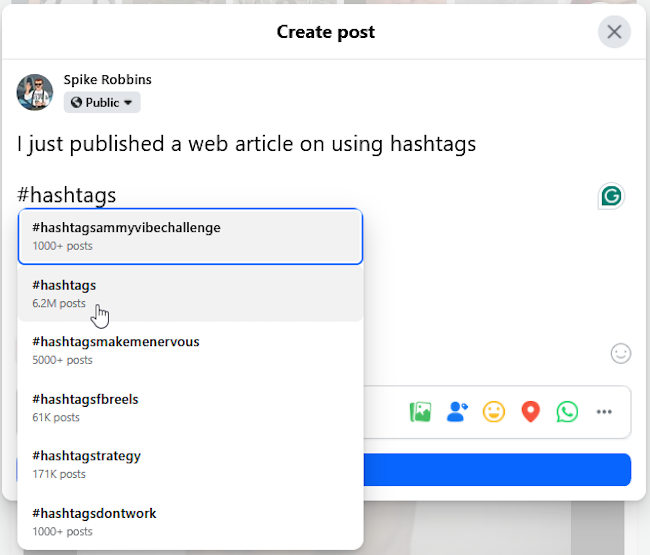
So for my post, I would pick #hashtags and #hashtagstrategy, and since this would be a web article about using hashtags, I think I would add #DigitalMarketing, #Blog, and #Blogging to round out my 5 hashtags.
High post number volume is great, but it doesn’t always have to be in the millions to matter. Of the 5 hashtags I selected, all are in the millions except for #hashtagstrategy with it’s 171K posts. Frankly, as a facebook account with 1000 friends and followers, being added to the 171K group would most likely grant me better views than the “millions” number hashtags. Think “less saturation” and better reading or view odds right?
Do Hashtags With High Post Numbers Work Better or Worse? The short answer: Neither is “better” by itself. High-post hashtags and low-post hashtags serve different purposes. A hashtag with a high post count means: thousands or millions of posts already use it, and lots of people are competing for attention.
Pros of High-Volume Hashtags
✔ More people follow or search them
✔ Good for brand awareness
✔ Signals a broad topic to the algorithm
Cons of High-Volume Hashtags
❌ Your post disappears fast
❌ Very competitive
❌ Hard for new or small accounts to be seen
The hard truth for high-volume hashtags is that your post may only stay visible for seconds.
What “Low Post Numbers” Mean. A hashtag with a lower post count is more specific.
Pros of Low-Volume Hashtags
✔ Less competition
✔ Longer visibility
✔ More targeted audience
✔ Higher chance of engagement
Cons of Low-Volume Hashtags
❌ Smaller audience
❌ Slower growth
So fewer people see it—but your post gets to the right audience. If you think about it, this should be your target audience, Your Tribe! This is the group of people you want converting into clicks, sales, memberships and more for your business.
How to tell the Difference Between Low, Medium, and High Volume Numbers
Hashtag Volume Levels (By the Numbers)
🟢 Low-Volume Hashtags (Best for Engagement)
Under 50,000 posts
🟡 Medium-Volume Hashtags (Best Overall Balance)
50,000 – 500,000 posts
🔴 High-Volume Hashtags (Best for Awareness Only)
500,000+ posts
So I can guess you want to know which works better? The smart strategy is to use a hashtag mix. Here’s the ideal approach most experienced marketers use across all social media platforms use:
1 broad hashtag (high volume) Example: #RetirementLife
2 niche hashtags (low–medium volume) Example: #RetireWithPurpose and #ActiveAgingCommunity
1 branded or personal hashtag (optional) Example: #JohnsRetirementJourney
This gives you:
✔ Reach
✔ Relevance
✔ Longevity
✔ Trust
Lower-to-mid volume hashtags usually perform better than massive ones. The reason why is, your social media platform will always favor relevance over popularity. Community-based content performs best for all of us, and it’s more engaging with your niche audience. Like any online content, be it YouTube, a blog, or social media: Content Is King! My advise to you is: dont ever forget that.
Step 3: Recommended number of hashtags on social media posts: Use Fewer Hashtags (Yes, Fewer)
The question here is how many hashtags should I, or can I, use on a post? You can see below in the chart, most social media platforms support up to 30 hashtags. But is it wise to use all of them? Does it really benefit your post?
As you can see besides the “max allowed” number, there is a more practical “best use” number, and that number is what you should focus on. Much like good SEO (search engine optimization) on a web page, spamming keywords (like too many #hashtags) can actually work against you. Don’t SPAM your posts with hashtags. Do not anger the algorithm gods!
Here’s a clear, no-nonsense list of the maximum recommended number of hashtags per social media platform, based on real marketing best practices (not myths or spam tactics).
| Platform | Max Allowed | Best Practice |
| 30 | 3–5 | |
| 30 | 5–10 | |
| X | No limit | 1–2 |
| No limit | 3–5 | |
| 20 | 3–5 | |
| TikTok | No limit | 3–5 |
| YouTube | 15 | 3–5 |
Pro Tip (From a Marketer’s Experience). Using fewer, relevant hashtags consistently beats using many random ones. Just remember: Hashtags are for clarity, not clutter.
At this point, if you haven’t considered it yet, you should start a Hashtag list. Start a spreadsheet of hashtags you frequently use. You can download my hashtag.xls and tweak it for your needs. I track mine by the niche, then #hashtag, and post numbers.
Step 4: Place Hashtags Naturally
So you really have two options here. Either works:
Option 1: At the End of the Post (Most Popular)
Example:
“It’s never too late to start something new. Retirement is just the beginning.
#RetirementMindset #NewBeginnings #HowToUseHashtags”
This keeps your message easy to read. Your audience gets to read your message without any distractions.
Option 2: Gently Inside the Sentence
Example:
“Many people in #RetirementLife are discovering new passions.”
This method you will want to use sparingly. Try to avoid stuffing hashtags into every sentence.
As you can see, this isn’t too hard to get. Depending on your content, hashtag placement doesn’t really matter, although I do feel placing your hashtags at the bottom of your post will be the most common method you’ll use as I do.
Common Hashtag Mistakes to Avoid
This ain’t rocket-science, but lets cover this just to clear things up
❌ Using Too Many Hashtags
It confuses the algorithm. It turns readers off. It looks unprofessional
❌ Using Hashtags That Are Too Broad
Using too many hashtags like: #Life or #Happy just means your post gets buried in seconds.
❌ Using Hashtags That Don’t Match the Content
This damages audience trust. The algorithm looks for relevance. Make sure your hashtags are relevant to your content.
❌ Copy-Pasting the Same Hashtags Every Time
This can reduce your reach over time. Rotate hashtags as often as you can
How to Find Good Hashtags Without Fancy Tools
First thing is, you don’t need paid software. You can do this yourself easily without any difficulty or cost other than your time. As matter of fact, you should treat finding relevant hashtags as important as researching your content or copy-writing. It should be an integral part of your content and planned for accordingly.
Here are simple, retiree-friendly methods.
1. Facebook Search Bar: Type a keyword and see suggested hashtags. Copy the ones you want to use.
2. Look at Similar Pages: Find pages or creators you like and review their hashtags. Use the ones relevant to your content
3. Think Like Your Reader: Ask yourself “What would I type if I were searching for this?”
Pretty easy huh? Like I said “It ain’t rocket-science!“
Final Thoughts: Keep It Simple and Consistent
If there’s one thing I want you to remember, it’s this: You don’t need to master social media to benefit from hashtags.
You just need to:
- Use a few relevant ones
- Stay honest and clear
- Think about your audience
When done correctly, hashtags quietly work in the background—bringing the right people to your content over time. And that’s how you build visibility without stress.
Want more practical, experience-backed articles like this? Subscribe to our newsletter today and get expert senior-focused tips, strategies, website updates, and announcements delivered straight to your inbox.