Is Learning ChatGPT For You?
Do you feel like you’re too old to learn ChatGPT? Have you ever wished you had a friendly helper who could answer your questions, help you write notes, or even tell you a joke when you need a smile? That’s exactly what learning ChatGPT for retirees can do for you! This post will walk you through what ChatGPT is, how to use it, and how to have fun while learning something new.
I use ChatGPT for all sorts of thing. Not only ChatGPT, but I also use Facebook’s Meta AI as well as Google’s Gemini.
What Is ChatGPT?
ChatGPT powered by something called artificial intelligence (AI) — a kind of technology that helps computers understand and respond to people’s words.
Think of learning ChatGPT as a smart, friendly personal assistant that lives inside your computer, tablet, or phone. You can talk to it verbally, or by typing a question or request, and it will talk back and respond with helpful answers.
1: With Learning ChatGPT You Can:
- Ask questions about anything (“What are some easy plants to grow indoors?”)
- Write letters, emails, or poems
- Get help with recipes or travel plans
- Learn something new at your own pace
The best part is, it never gets tired or impatient with you – it’s always there ready and available to help!
2: How to Talk to ChatGPT:
How you communicate with ChatGPT is by writing or dictating something called a prompt. A prompt is simply what you tell ChatGPT to do or answer. Some prompts are simple and others can be somewhat complex. It’s important to remember that writing great prompts is a learned skill. You will get better over time as you continue learning ChatGPT.

3: Writing good prompts, a step by step guide:
#1: Be Clear and Concise
Say exactly what you want. Be as specific as possible. You will get better results.
❌ Don’t say: “Write something about cooking.”
✅ Do say: “Write a short paragraph about easy cooking tips for seniors.”
#2: Ask One Thing at a Time
If you ask the AI application too many questions at once, it can get confusing. Ask one question, you can then follow up with more questions if you need more info.
Now, lets get real. While learning ChatGPT, you can ask ChatGPT more than one thing in a single prompt. Just don’t overwhelm it with useless blathering. For example, let’s say you’re writing a post on golf for beginners for a web page and you’re looking for a few long-tail keywords you can use for your article to help with your SEO (search engine optimization). Try this prompt: (copy it into chatGPT and submit it)

As you can see in my prompt example above, I asked ChatGPT 3 things in my prompt. I asked for:
- to provide a list of 20 high volume, medium to low competition keywords.
- using the topic “golf for beginners”
- and setting the keyword length to 3-7 words long.
I could of added one more thing to the prompt and that was to set a tone. Like “make the tone informational” if I want my keywords to be informational , or “make the tone humorous” to have funny keywords.
Has Your Computer Been Hacked? Find Out Now
I got 20 examples. If I were writing about golf for beginners, there were about a dozen great long-tail keyword suggestions in that list I would choose from.
#3: Give a Little Detail
Adding details while learning ChatGPT helps ChatGPT understand better.
✅ Example: “Write a thank-you letter to my friend Linda for the homemade cookies.”
#4: Have Fun With It!
Ask for stories, games, or poems!
✅ Example: “Tell me a funny story about a forgetful penguin.”
✅ Example: “Make up a short poem about friendship.”
✅ Example: “Create 10 title examples for a website article about “print-on-demand stores“
Ready to get crazy about learning ChatGPT for retirees. Let’s have some fun with this. Your next prompt example will be to learn a new thing. What do you want to learn? Spanish (if attempting to learn another language, do this in voice mode)? How about how to make candles, or how to draw a lizard? So think of a topic you want to learn and you can copy this text into ChatGPT. Replace the “making a video with a talking avatar” with the topic of your choice.
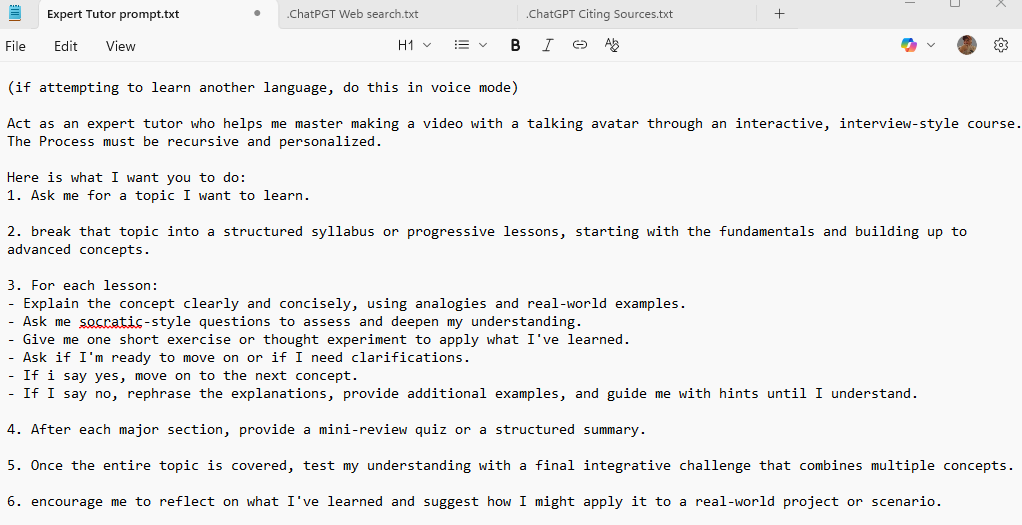
The topic I chose was “making a video with a talking avatar” And let me tell you, I am still working through the lessons. ChatGPT knocked this one out of the park in my opinion.
Feel free to copy that prompt and tweak it for your needs. It is both fun and EDUCATIONAL.
More Fun Prompts to Try
Go for it! Start asking ChatGPT anything you want. Here are some ideas to get you started:
- “What’s a simple explanation of the Internet?”
- “Give me three easy brain exercises.”
- “Write a cheerful message for my grandson’s birthday.”
- “What are five hobbies I can enjoy at home?”
- “Tell me a good quote to start my day.”

4: Advanced Prompts
Are you ready go try something deep? Ready to see how much a prompt can do?
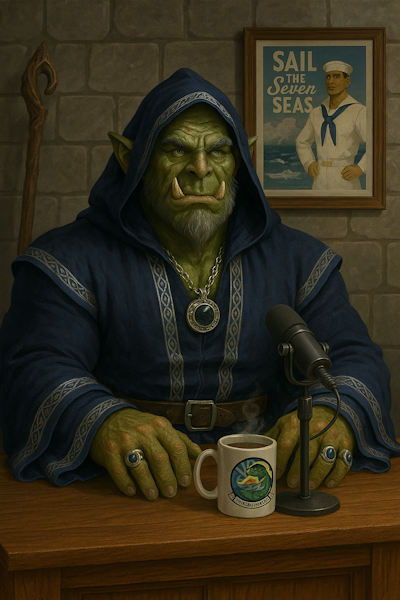
I had the idea to create a talking avatar for a gaming YouTube channel. This avatar need to be a game race class. I chose an orc. I also wanted to give him some real-life personality. As a US Navy veteran I added some USN flair to this image as you can see in both the prompt and the image output.
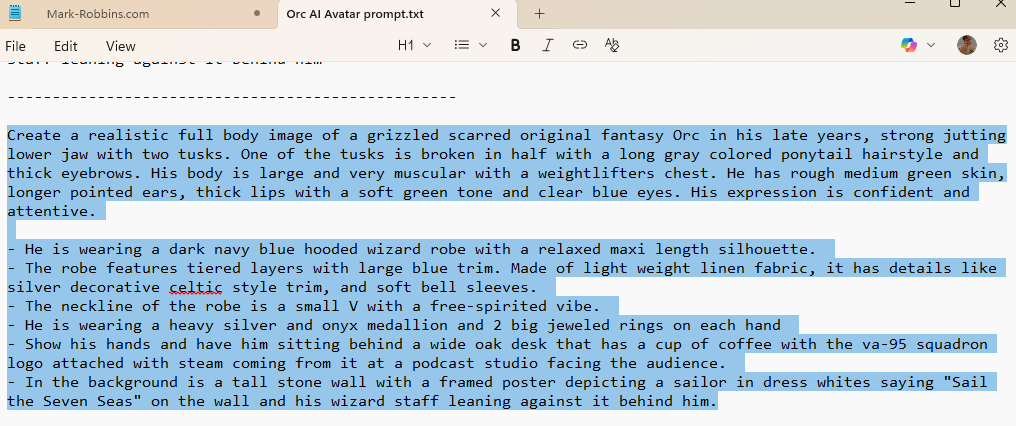
Feel free to copy the prompt and change it to suit your needs. You can have a lot of fun with this prompt!
This was the result I got using ChatGPT. Pretty cool if you ask me.
5: Saving Your Prompts
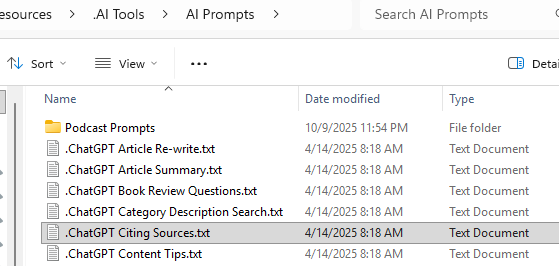
Before we get too busy here with creating prompts. I use Windows 11’s “Notepad” for my prompt creation. All my grunt-work is with Notepad. Once I have a prompt I like, I save it as a txt file to re-use later. Copy the text you need from Notepad into ChatGPT. I store these text file (.txt) in a folder in My Documents as you can see below.
6: Helpful Tips for Learning ChatGPT for Retirees
- No need to worry about spelling or grammar. ChatGPT understands plain language.
- Be curious. Ask about topics you love — music, gardening, books, or pets.
- If you prompt different AI’s with the same prompt, you can expect similar answers with ChatGPT and Gemini, where Facebooks Meta AI might give an answer more in the form of a social media post.
- Use it for learning. You can ask, “Explain how to use a smartphone camera,” and it’ll teach you step by step.
- I’ve noticed that the AI’s will also tell you when it cannot do some things when it comes to copywrite infringement. If it doesn’t like what you’re requesting it to do, it will tell you.
- BE AWARE! ChatGPT can and does “Hallucinate” While using ChatGPT can be fun, be aware that it is not always accurate. It does get things wrong. So if you’re using it for factual information, just like a doctors diagnosis, when in doubt or you’re not sure, get a second opinion. DOUBLE CHECK IT!
Final Thoughts
ChatGPT isn’t just a tool for tech experts — Learning ChatGPT for Retirees is a new way to explore ideas, learn new things, and have fun conversations. Think of it as your digital friend who’s always ready to chat, teach, and make your day a little brighter.
So go ahead — open ChatGPT and say hello! You might be surprised at how much you enjoy it.
Want more practical, experience-backed articles like this? Subscribe to our newsletter today and get expert senior-focused tips, strategies, website updates and announcements delivered straight to your inbox.