Introduction: Why A Print-on-Demand Store Is the Perfect Online Business Model
Starting an online print-on-demand store selling tee-shirts in 2025 is easier and more affordable than ever. With print-on-demand (POD) services, you can create and sell custom designs without buying inventory upfront. The supplier prints and ships products directly to your customers, leaving you free to focus on creativity and marketing.
This model is ideal for designers, entrepreneurs, content creators, and retirees who want to build a brand with low risk, minimal overhead, and a desire to create passive income.
Chapter 1: Understanding the Print-on-Demand (POD) Model
A print-on-demand store means you don’t hold inventory. You upload your designs to a POD platform, link it to your online store, and when a customer places an order, the supplier prints and ships it automatically.
Key benefits of a Print-On-Demand store:
- No inventory risk: You only pay when an order is made.
- Low startup cost: Most platforms are free or low-cost to start.
- Scalable: Easily expand from T-shirts to hoodies, tote bags, posters, coffee mugs, and even digital products like courseware.
- Automation: Printing, packing, and shipping are handled for you.
Popular POD providers include:
You’ll want to choose your print-on-demand store provider carefully. Some offer free, but limited product space, others will charge a monthly fee. What is important is that it fits your needs and that you can expand and grow in that platform.
- Fourthwall– High-quality printing and wide product range.
- Printful – High-quality printing and wide product range.
- Printify – Competitive pricing and multiple supplier options.
- Gelato – Global fulfillment for fast shipping.
- TeeSpring (now Spring) – Great for creators and influencers.
- Spreadshop – Great for creators and influencers.
Chapter 2: Choosing the Right Niche for Your Print-on-Demand Store
Before launching, define your target audience. Your niche determines your design direction, tone of voice, and marketing strategy. Finding your niche is easily the most important step in the process of setting up your print-on-demand store. It is crucial!
Profitable niche examples:
- Pet lovers (dogs, cats, parrots)
- Fitness and gym motivation
- Military-Veteran-First Responder
- Eco-friendly lifestyle
- Funny memes and quotes
- Occupation-specific shirts (nurses, teachers, engineers)
- Pop culture and gaming references
Tips for finding your niche:
Choose something you’re passionate about — it keeps you motivated. I think what it comes down to is “whose your tribe?” For most of us, our store is a reflection of us as an individual. It’s your vibe, it’s your tribe. The customer you’re looking for, is someone just like you.
Use Google Trends and Pinterest to track popular themes.
Browse Etsy or Redbubble to identify gaps.
SEO tip: Include your niche keyword in your store name and domain (e.g., EcoThreads.com or GeekTees.store).
Chapter 3: Creative Product Ideas to Stand Out
While T-shirts are the main product, you can diversify with complementary items to increase your average order value.
Top print-on-demand product ideas:
- Classic unisex T-shirts
- Crop tops and tank tops
- Hoodies and sweatshirts
- Tote bags and backpacks
- Mugs and water bottles
- Posters and wall art
- Embroidered hats
- Phone cases
Design ideas that sell:
In the competitive print-on-demand store market, successful designs combine creativity with commercial awareness. “Designs that sell” are not only visually appealing but also connect emotionally with your target audiences. Designs that sell blend art with marketing insight—they speak directly to a defined audience, evoke emotion, and look great in real-world use.
- Minimalist typography
- Retro or vintage aesthetics
- Hand-drawn illustrations
- Trend-based designs (AI, space, crypto, mindfulness)
- Personalized text or names
Ideas are endless right?
Pro Tip: Use mockup tools like Placeit or Canva SmartMockups to visualize products professionally.
Chapter 4: Selecting the Best POD Platform
Your platform is where you’ll host and manage your store. Here’s a quick breakdown:
Shopify + Printful or Printify
- Easiest setup and best automation.
- Great for long-term branding.
- Monthly fee but excellent integrations.
Etsy + Printify
- Ideal for beginners.
- Built-in audience of 90+ million shoppers.
- You still own your brand but, you will have to compete on visibility.
WooCommerce + Printful
- Free WordPress plugin.
- More control and customization.
- ordPress plugin.
- More control and customization.
- Slightly more technical setup.
You have options here like Fourthwall or Spreadshop. It’s important to have a great starting point, but also a platform host that you can grow and expand with.
SEO Tip: Shopify and WooCommerce both support robust SEO plugins and metadata editing — essential for ranking on Google.
Now that you have selected a host provider, it’s time to think of a catchy name for your print-on-demand store.
Chapter 5: Naming Your Print-on-Demand Store – Making It Catchy, Memorable, and Brandable
Your store name sets the tone for your brand. It needs to be short, memorable, and relevant to your niche. A great store name will contribute a lot towards not only your brand recognition, but also count heavily towards SEO (search engine optimization). Think long and hard about your print-on-demand store name. Check out the tips below:
Naming strategies:
- Combine niche + emotion (e.g., HappyHiker Tees).
- Use humor or wordplay (PunnyThreads, TeeRiffic).
- Create a modern, sleek brand name (UrbanInk, BoldFit).
- Keep it easy to spell and pronounce.
If you’re not sure about coming up with a great name, I would suggest using ChatGPT to assist with this.
Check availability:
Use Namecheap, PorkBun or GoDaddy to check if your chosen domain name is available. Ensure it’s unique on Facebook, YouTube, Instagram, TikTok, Pinterest, and other platforms to secure consistent branding.
SEO keyword examples for names:
“Tee,” “Threads,” “Wear,” “Apparel,” or “Co.”
Combine with your niche: EcoThreads, CatMamaTees, CryptoWearCo.
Chapter 6: How to Add a Custom Domain Name to Your Print-on-Demand Store
Your domain is your digital address — it adds professionalism and trust.
Step-by-Step Guide:
Buy your domain from a registrar like SquareSpace (formerly Google Domains), Namecheap, PorkBun or GoDaddy
The ideal extensions for a print-on-demand store are: .com, .store, .co, or .shop.
Connect your domain to your store platform:
Shopify: Go to “Settings → Domains → Connect Existing Domain.”
WooCommerce: Use your hosting provider’s DNS manager.
Etsy: Redirect your domain to your shop link using your registrar settings.
Enable SSL for secure browsing (https://).
Optimize your domain for SEO — keep it simple, keyword-rich, and brand-aligned.
Example: If your niche is eco-friendly shirts, a domain like GreenThreadShop.com tells search engines exactly what you sell.
Chapter 7: Designing and Mocking Up Your First T-Shirts
Design Tips:
You are going to need a software tool to create your designs. Use design tools like Canva, Adobe Illustrator, or Affinity Designer. Of these tools, I would recommend Canva as your most affordable choice
If you’re looking for a free alternative, I recommend using Paint.net. It’s free and easy to learn and use, and be sure to download all the free plug-ins for it too. Another great free graphic editor is GIMP.
- Stick to high-resolution (300 DPI) transparent PNG files.
- Avoid copyright infringement — use original artwork or royalty-free graphics.
- Keep designs versatile for both light and dark shirts.
Mockup Creation:
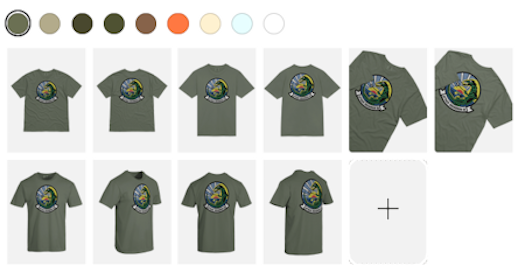
Use mockup generators from Printful, Printify, or Placeit to preview products. Display diverse models and lifestyle images for realism.
Branding Tips:
Create an “inside label” and be sure to add your custom inside label (if supported) for a professional touch. Brand consistency builds customer trust and loyalty.

Chapter 8: Setting Prices and Profit Margins
Pricing affects both perception and profit. I’m not about to attempt to come up with a pricing guide in here. You’ll have to look at your merch costs on your hosting platform, product availability, etc. The best thing you can do is do your own market research and set a price for you’re comfortable with for your products.
In closing:
It’s time to wrap this all up. As a retiree, having a print-on-demand store not only gives you some purpose, it allows you to release that creative energy you’ve got bundled up inside of you, and hopefully provides you with a passive income stream.
Some quick tips:
- Social media memes make great sources for inspiration for your merch designs. Don’t be afraid to poach stuff.
- It is ESSENTIAL to learn how to make transparent backgrounds and using layers with Paint.net. You’ll use this on every design. It’s easy to learn.
- Stick to one, two, no more than three color designs and think bold-thick easy to read font styles. You can’t go wrong with simple black and white colored designs. Plus, this is easier on you as a designer.
- Avoid using copyrighted graphics like Disney, athletic teams, etc. Tread carefully and don’t become a magnet for corporate lawyers.
- Follow the KISS method – Keep It Simple Stupid. Don’t make this any harder than it needs to be. Folks should be able to notice your design at a glance.
Want more practical, experience-backed articles like this? Subscribe to our newsletter today and get expert senior-focused tips, strategies, website updates and announcements delivered straight to your inbox.