
ChatGPT can be an incredibly helpful companion—whether you’re learning something new, writing messages, exploring hobbies, or simply having fun. What many people don’t realize is that you can guide ChatGPT to respond in ways that feel more natural and personally useful by adjusting a few simple ChatGPT parameters. Think of these parameters as small controls that help you fine-tune the conversation so the answers match your style and needs.
By choosing the right tone, you can make ChatGPT sound more professional, more friendly, or anywhere in between. Adjusting the level lets you decide how simple or detailed the explanation should be. And with the temperature setting, you can choose whether you want responses that are straightforward and factual or more imaginative and creative.
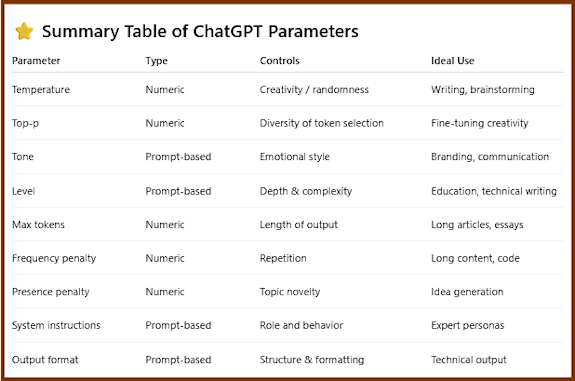
Understanding these options isn’t technical or complicated—it’s actually quite easy. And once you know how to use them, you’ll get answers that feel clearer, more engaging, and better suited to your goals. Whether you’re writing a poem, solving a problem, or exploring new ideas, these ChatGPT parameters can help you get the most out of every conversation.
This guide will walk you through each setting step-by-step so you can enjoy a smoother, more personalized ChatGPT experience—one that encourages creativity, supports learning, and makes everyday tasks feel easier. Let’s get started and make ChatGPT work beautifully for you.
How To Write A Prompt Using ChatGPT Parameters
ChatGPT parameters are easy to add to your prompts. Here are a few examples showing you how to add any ChatGPT parameter into a prompt.
ChatGPT Parameter Example Prompt Using Tone + Structure + Creativity
“Create a short story about a retired teacher who starts painting again. Use a warm, uplifting tone and write at an intermediate reading level. Set the temperature to 0.8 to make the story creative and imaginative. Format it in 3 short paragraphs.”
ChatGPT Parameter Example Prompt Using Multiple Parameters Tone + Level + Temperature
“Explain how solar panels work using a friendly and conversational tone, at a beginner level. Keep your explanation simple and easy to understand. Use a low temperature (0.3) so the response stays clear and factual.”
ChatGPT Parameter Example Prompt Using Tone + Level + Role + Temperature
“You are a patient, friendly tutor. Explain basic budgeting to a senior who is new to managing finances. Use a simple, reassuring tone and avoid jargon. Keep the creativity low by using temperature 0.25 so the explanation is clear and structured.”
ChatGPT Parameter Example Prompt Using Tone + Detail Level + Output Style
“Summarize the benefits of meditation using a neutral and informative tone. Write at a basic reading level with short sentences. Use bullet points and keep the temperature at 0.4 for clarity.”
As you can see adding the ChatGPT parameters are pretty easy. In the above examples its part of a short paragraph, but you can also add them a bullet points in your prompt as well.
Read About How Learning ChatGPT Will Benefit Retirees Today
Meet Your ChatGPT Parameters
Ready to meet your 9 different ChatGPT Parameters? Let’s break them down into what each parameter does.
1. ChatGPT Parameters: Temperature
The temperature parameter is like a creativity slider for ChatGPT. It helps you control how imaginative, predictable, or varied you want the response to be. You’re basically telling ChatGPT whether to “play it safe” or “think outside the box.” The easiest way to explain the Temperature parameter is:
- Lower temperature = more accurate and predictable
- Higher temperature = more creative and exploratory
Here’s how it works:
Low Temperature (0.0–0.3)
- This setting makes the AI more careful and factual.
- Responses are steady, consistent, and reliable.
- Great for clear explanations, instructions, technical topics, or when you want ChatGPT to stick closely to commonly accepted answers.
Medium Temperature (0.4–0.7)
- This gives a natural balance.
- Responses feel conversational, thoughtful, and still grounded.
- Ideal for general discussions, advice, and everyday content.
High Temperature (0.8–2.0)
- This makes the AI more creative and expressive.
- You’ll get more imaginative and surprising responses.
- Perfect for brainstorming, storytelling, poetry, or playful writing.
Examples of How to Use The Temperature Parameter in a Prompt
Example 1: Low Temperature (Clear & Reliable)
“Explain how Wi-Fi works in simple terms. Use a friendly tone and keep the temperature at 0.2 so the answer stays clear and factual.”
Example 2: High Temperature (Creative & Fun)
“Write a short, imaginative story about a senior who discovers a talking cat in their garden. Use a warm tone and set the temperature to 0.9 to make the story creative and playful.”
Download Your Free ChatGPT Parameter Cheat Sheet
2. ChatGPT Parameters: Tone
Why setting the tone parameter matters?
ChatGPT does not have a built-in “tone dial,” but tone is shaped through instructions. The Tone ChatGPT parameter is used for branding, communication style, customer support, writing roles.
Selecting the right tone helps you:
- Get responses that match your audience or niche.
- It improves content clarity and communication with your readers and customers.
- It helps create more engaging, professionaland BETTER content.
- It make the AI feel more personal in helping you.
Common tones:
- Friendly Tone is for when you want to be Warm, approachable, and positive. This ChatGPT parameter s best used for customer interactions, helpful explanations, and casual conversation topics.
- Formal Tone is your choice for polished, professional, respectful media content. The ChatGPT parameter is used for business writing, official communication, and academic topics.
- Professional Tone is for when you want to convey a clear, objective, business-like message. Use this ChatGPT parameter for emails, reports, presentations, and workplace communications.
- Conversational Tone is the best tone to use when you want to sound natural, human-like, conversational-like, or relaxed. Use this chatGPT parameter when you are writing general explanations, social media posts, or storytelling.
- Empathetic Tone for when you need to be supportive, understanding, compassionate. This ChatGPT parameter is used for sensitive topics, guidance, and when offering encouragement to your readers.
- Humorous Tone is perfect for light-hearted, playful, and entertaining content. Use this ChatGPT parameter when you need do some creative writing, write informal posts or ice-breaker content.
- Analytical Tone is perfect when you need to “mansplain” a topic. You know.., when you need to breakdown logical, structured, or fact-focused content.
- Authoritative/Assertive Tone for when you need to be confident, direct, or expert-like. You can use this ChatGPT parmeter to create instructions, leadership communication, expert advice content.
- Encouraging/Motivational Tone is great for writing positive, uplifting, and confidence-building media. You would find this useful in creating content for coaching, learning, or self-improvement material.
- Narrative/Storytelling Tone is best describe as descriptive, expressive, or engaging and is useful for story-telling, blogs, and creative content.
Examples Of How To Use The Tone Parameter In A Prompt
Example 1: Friendly Tone
“Explain what password managers are using a friendly and reassuring tone. Keep the explanation simple and approachable, as if you’re helping someone who is new to technology.”
Example 2: Professional Tone
“Write a professional and concise email informing a customer that their order has shipped. Use a polite, businesslike tone and keep the message clear and direct.”
3. ChatGPT Parameters: Level (Complexity/Depth/Expertise)
The level parameter helps you decide how simple or how advanced you want ChatGPT’s response to be. Instead of giving you a one-size-fits-all answer, ChatGPT can adjust its language, detail, and difficulty level to match your comfort level or your audience.
Think of it as choosing the reading level, depth, or complexity of the explanation. You can ask for:
Beginner Level
- Very simple wording
- Everyday examples
- No technical terms
Often written around a 5th–8th grade reading level. Perfect for: new learners, seniors, children, or when a topic is brand-new.
Intermediate Level
- More detail
- Mix of simple and technical terms
Often written around a 9th–12th grade reading level and is perfect for most adults, hobby learners, and general readers.
Advanced / Expert Level
- Deep explanations
- Technical vocabulary
- Professional terminology
Often written at a college or graduate level and is best for researchers, professionals, and advanced learners.
Why the Level Parameter Matters
- Understand information more easily
- Avoid too much jargon
- Get exactly the amount of detail you want
- Communicate better with your intended audience
It’s a simple instruction that can make ChatGPT’s answers feel perfectly tailored to you and your readers.
Examples of How to Use The Levels Parameter in a Prompt
Example 1: Beginner/6th Grade Level
“Explain what a computer virus is using a friendly tone and a beginner level. Write it at about a 6th-grade reading level and keep the explanation simple.”Max Tokens
Example 2: Advanced/College Level
“Explain how electric cars work at an advanced, college-level depth. Use a clear but professional tone and include technical terms where appropriate.”
4. ChatGPT Parameters: Max Tokens
The max token parameter controls the maximum length of ChatGPT’s response. A “token” is just a chunk of text—usually a few characters or part of a word. This parameter is especially helpful when you want the response to fit a certain format—like a paragraph, a short list, or a more complete piece of writing. You don’t have to count them yourself; the main idea is simple:
Lower max tokens = shorter responses
- Quick summaries
- Short answers
- Brief emails
- Simple explanations
Higher max tokens = longer responses
- Great for:
- Articles
- Stories
- Detailed guides
Step-by-step explanations
- In other words, max tokens is like setting the size limit on how long ChatGPT can talk.
- If you want a short and sweet answer, set it lower.
- If you want a full, detailed explanation, set it higher.
Examples of How to Use The Max Tokens Parameter in a Prompt
Example 1: Short Response
“Explain what two-factor authentication is in a friendly tone. Keep it very brief and set the max tokens to 80 so the answer stays short.”
Example 2: Longer, More Detailed Response
“Describe how electric vehicles work using a clear and informative tone. Provide a detailed explanation and allow for a longer answer by setting the max tokens to 500.”
5. ChatGPT Parameters: Frequency Penalty
The frequency penalty is a parameter that helps control how often ChatGPT repeats the same words or phrases in its response. Think of it as a gentle nudge that says, “Try not to repeat yourself too much.”
Here is how the Frequency Penalty parameter works. It’s on a sliding scale and you set it using the criteria below
0.1 – 0.5 — Light Penalty (Slightly Less Repetition)
- Encourages minor variation but still feels natural.
- Ideal for shorter paragraphs or casual writing.
- Helps keep responses smooth without forcing unusual synonyms.
0.6 – 1.0 — Moderate Penalty (Noticeable Variety)
- Reduces repeated words more strongly.
- Good for creative writing, product descriptions, marketing text.
- Makes wording feel fresh and more expressive.
1.1 – 1.5 — Strong Penalty (High Variety, Low Repetition)
- The model works harder to avoid repeating anything.
- Great for poetry, storytelling, and longer creative pieces.
- Can introduce unusual or unexpected synonyms.
1.6 – 2.0 — Maximum Penalty (Almost No Repetition)
- ChatGPT avoids repeating words unless absolutely necessary.
- Produces highly varied, creative, and sometimes surprising language.
- Best for brainstorming or experimental writing.
- Not ideal for instructions or topics that require precision.
Great for creative writing, long descriptions, storytelling, or any content where repetition might become annoying
In simple terms:
Higher frequency penalty = less repetition and more variety.
Lower frequency penalty = more natural repetition when needed.
This parameter is especially helpful when writing longer content, poems, stories, marketing material, or anything where you want fresh, varied wording.
Examples of How to Use The Frequency Penalty Parameter in a Prompt
Example 1: Reduce Repetition in Creative Writing
“Write a short paragraph describing a peaceful garden. Use a warm tone and set the frequency penalty to 1.2 so the wording stays varied and avoids repetition.”
Example 2: Allow Natural Repetition for Clarity
“Explain what online banking is using a friendly, beginner-level tone. Keep the frequency penalty at 0.0 so you can repeat key words naturally to make the explanation clear.”
6. ChatGPT Parameters: Presence Penalty
The presence penalty is a parameter that helps ChatGPT decide whether it should stick closely to the topic or explore new ideas. Think of it as a nudge that says: “Stay focused,” or “Feel free to be more adventurous.”
Here’s how the Presence Penalty parameter works:
Low or Zero Presence Penalty (0.0)
- ChatGPT stays on the main topic.
- It does not try to introduce new ideas unless you ask for them.
- Great for clear explanations, instructions, or staying consistent.
Higher Presence Penalty (0.5–2.0)
- ChatGPT is encouraged to bring in new topics, fresh ideas, or different angles.
- Makes the response more exploratory and inventive.
- Excellent for brainstorming, creative writing, and idea generation.
In short, what the presence penalty does is:
- Low presence penalty = stay focused on the main subject
- High presence penalty = explore more new ideas and possibilities
This parameter is especially helpful when you want creative, wide-ranging thinking—or when you want ChatGPT to keep the conversation tightly on track.
Examples of How to Use The Presence Penalty Parameter in a Prompt
Example 1: Encourage New Ideas (Higher Presence Penalty)
“Brainstorm unique weekend activities for seniors that are fun and social. Use a cheerful tone and set the presence penalty to 1.0 so you explore fresh and creative ideas.”
Example 2: Stay Focused on the Main Topic (Low Presence Penalty)
“Explain what digital wallets are using a friendly, beginner-level tone. Keep the presence penalty at 0.0 so the explanation stays focused and doesn’t introduce unrelated topics.”
7. ChatGPT Parameters: System/Role Instructions
The System/Role Instructions parameter is one of the most powerful ways to guide how ChatGPT behaves. Instead of adjusting creativity or length, this parameter tells the AI who it should act as and how it should approach the conversation. Think of it like giving the AI a “role” in a play. Once you set the role, ChatGPT tries to stay in character throughout the conversation.
Here’s what it does:
Defines the role or identity of the AI
You can tell ChatGPT to be:
- A friendly teacher
- A professional editor
- A travel guide
- A financial expert
- A supportive coach
- A tech helper for beginners
This helps shape the tone, style, expertise, and behavior of the responses.
Sets behavioral rules
You can tell ChatGPT how you want it to behave, such as:
- Be patient and gentle
- Use simple examples
- Be highly analytical
- Provide step-by-step instructions
- Use humor
Improves consistency
Role instructions help ChatGPT respond in a steady, predictable way—great for long conversations, tutorials, or professional tasks.
In simple terms:
- System/Role Instructions tell ChatGPT how to act and who to be while answering your querries.
- It’s like giving the AI a persona so it can match your needs more closely.
Examples of How to Use The System/Role Instructions Parameter in a Prompt
Example 1: Friendly Tutor Role
“You are a friendly and patient tutor who explains technology to beginners. Please describe what cloud storage is in simple, easy-to-understand terms.”
Example 2: Professional Writing Assistant Role
“You are a professional writing assistant. Help me rewrite the following paragraph using a clear and confident tone suitable for a business email.”
8. ChatGPT Parameters: Output Format
The Output Format parameter tells ChatGPT how you want your answer to look. Instead of changing the tone or creativity, this parameter focuses on organizing and shaping the structure of the response.
Think of it as choosing the “container” for your information.
You can ask ChatGPT to format the output as:
- Bullet points
- Numbered lists
- A paragraph
- A table
- Step-by-step instructions
- A checklist
- A script
- A short email
- A social media post
- JSON or code-like formatting (for technical users)
This is incredibly helpful because it makes the response easier to read, more organized, and perfectly matched to your task—whether you’re writing an email, comparing items, creating a recipe, or generating a guide.
Why It Matters
The Output Format parameter helps you:
- Save time organizing information
- Get content in the exact layout you need
- Make instructions clearer
- Present information in a more polished way
It’s one of the simplest but most powerful parameters you can use.
Examples of How to Use The Output Format Parameter in a Prompt
Example 1: Bullet Points Format
“Explain the benefits of walking for seniors using a friendly tone. Format the answer as bullet points so it’s easy to read.”
Example 2: Table Format
“Compare three common password manager apps using a clear and informative tone. Present the information in a table format with columns for Features, Ease of Use, and Cost.”
Conclusion: Making ChatGPT Work Beautifully for You
ChatGPT parameters are like gentle knobs and dials that help you fine-tune the kind of answers you get—without needing any tech wizardry. Each parameter plays a special role in shaping how the AI communicates with you.
With a few simple instructions, you can get answers that are easier to understand, more engaging, and perfectly suited to your needs. Whether you’re learning something new, writing messages, or exploring creative ideas, these parameters help ChatGPT feel less like a machine and more like a friendly assistant designed just for you.
Want more practical, experience-backed articles like this? Subscribe to our newsletter today and get expert senior-focused tips, strategies, website updates, and announcements delivered straight to your inbox.