A computer can get hacked even when you’re careful, update your software, and run a trusted antivirus. Cybercriminals are creative—and persistent—which is why spotting the early signs of a breach is so important.
Acting fast can limit the damage, protect your data, and save you from a major headache later. Here are the most common clues that your computer has been hacked—and what steps to take next.
Why Hackers Break Into Computers
Cybercriminals usually want two things: your money and your information. A hacked device can be used for:
- Financial fraud
- Identity theft
- Installing malicious tools for long-term spying or profit
It’s not just business-class computers that have any value to a hacker, it’s personal pc’s too. They want access to your bank and financial information, or medical history. You name it, they can milk data from your PC if you’re not careful.
As the daily user of your computer, you’re the first person who will notice when something feels “off”, it’s possible your computer has been hacked. Trust those instincts.
Major Warning Signs Your Computer Has Been Hacked
1. Your Computer Suddenly Slows Down
If your computer feels like it’s running through mud, something might be stealing its resources. Sudden drops in speed—slow boot times, apps taking forever to open, or basic tasks lagging—can mean malware is running in the background. It’s possible your computer has been hacked.
Hackers often install things like:
- Cryptomining software
- Botnet tools
- Keyloggers
- General malware designed for spying or profit
If you aren’t doing anything intense but your CPU sounds like it’s preparing for takeoff, that’s a red flag.
2. Apps Start Acting Weird
If an app you’ve used forever suddenly crashes, glitches, or throws strange error messages, it might not be the app—it might be malware. Malicious software such as spyware, Trojans, keyloggers, and viruses can:
- Corrupt system files
- Interfere with programs
- Cause conflicts and crashes
Think of it as a party crasher disrupting everything.
3. Strange Network Activity
If your home’s internet usage skyrockets for no reason, it’s possible your computer has been hacked and could be secretly sending data to a hacker-controlled server. This might include:
- Photos
- Videos
- Documents
- Saved passwords or login credentials
If your Wi-Fi meter is maxed out while you’re only checking email, something suspicious may be going on.
Read How Learning ChatGPT Will Immediately Benefit Retirees
4. Your Security Software Is Disabled
Good cybersecurity programs don’t just turn themselves off. If your antivirus is suddenly disabled—and you didn’t do it— it’s possible your computer has been hacked & malware may be trying to hide.
Another giveaway: you can access normal websites, but security sites like antivirus vendors won’t load. Hackers love blocking these to keep you vulnerable. This is the digital equivalent of a burglar cutting your home’s alarm system.
5. Popup Ads, Browser Changes, and Other Chaos
If your browser homepage changes on its own, you see nonstop pop-ups, or you’re being redirected to sketchy websites, your computer likely has malware.
Other symptoms include:
- Encrypted files
- Missing or locked documents
- Random browser toolbars
- Pop-ups that return instantly after being closed
These are classic signs of adware, ransomware, or unauthorized remote access.
6. Odd Behavior in Your Online Accounts
If you suddenly can’t log into your email, social media, or banking account—even with the correct password—it’s possible your computer has been hacked and your credentials may have been stolen.
Watch for:
- Password reset messages you didn’t request.
- Login attempts from unknown locations.
- Notifications about changed passwords.
This often means the hacker has already accessed your system and is now targeting your accounts.

7. System and File Changes
Unexplained changes on your device can be a big warning sign:
- New programs you didn’t install
- Missing or altered files
- Disabled system tools
- Unknown programs running at startup
If your computer feels like it’s operating on someone else’s rules, it probably is.
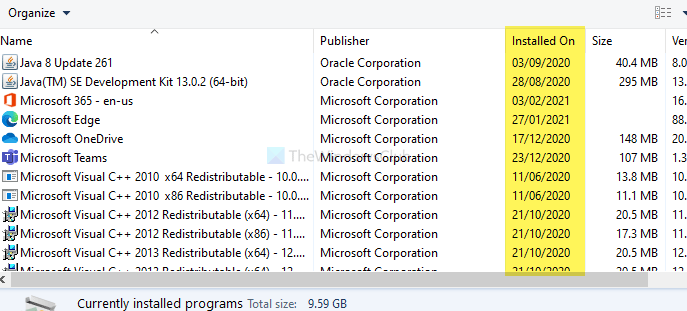
One thing you can do is look at your Applications in your Control Panel. Find the Installation date for apps or programs and see which ones are new that you are unaware of.
You can use the Control Panel to find the app installation date on Windows 10. It shows the installation date in the same location from where you uninstall the installed software. To get started, search for “control panel” in the Taskbar search box and click on the respective result to open the Control Panel on your computer. After that, click on the Programs and Features option. If it is not visible, set the View by as Large icons.
Once you are in the Programs and Features panel, find out the app and check out the Installed On column.
8. Other Suspicious Signs Your Computer Has Been Hacked
Some of the more dramatic signs of hacking include:
- Your mouse moves on its own
- Unexpected financial charges or credit alerts
- Text appears without you typing
- Webcam light turns on unexpectedly
- Random apps request access to your camera or mic
- Friends report spam messages from you
- Strange emails in your “Sent” folder
If your computer starts acting like it’s possessed, malware is a much more likely explanation than ghosts.
What to Do If You Think Your Computer Has Been Hacked
If something seems wrong, take these steps right away:
- Disconnect from the Internet: This prevents more data from being stolen.
- Do NOT restart your computer: Restarting can destroy evidence or activate malware that runs on boot.
- Document what you noticed: Take notes or photos of error messages, pop-ups, weird behavior, etc.
- Bring your computer to a professional: Unless you can resolve this yourself, a tech expert can safely inspect and remove malware without causing additional damage.
Make sure your computer’s Antivirus software is current and up to date. If you don’t have an AV app installed on your computer, you can look at these and choose:
- Microsoft Defender
- Norton Antivirus – This is the one I use.
- Malwarebytes
- McAfee
There are more anti-virus applications out there. Find the one that fits your budget and gives you the best bang for your buck.
A quick note about FREE antivirus applications. If it’s FREE, it means one of two things. One, is that it’s very limited in what it can do. The other is it might be infected with a virus itself. So be careful of what you install. If you’re not sure, call your local PC tech.
Once your system is clean:
- Change all your passwords. ESPECIALLY ANYTHING FINANCIAL RELATED
- Enable two-factor authentication anywhere you can.
- Review your account activity regularly.
How To Set A Secure Password
- Make it long: Aim for at least 12–16 characters. Longer = stronger.
- Mix it up: Use uppercase, lowercase, numbers, and symbols.
- Avoid personal info: No birthdays, names, pets, or favorite sports teams.
- Use passphrases: Combine random words—for example: Purple!Snowman$Galaxy2025—both strong and memorable.
- Don’t reuse passwords: One leak shouldn’t give hackers access to your entire life.
- Enable 2FA: Two-factor authentication adds an extra lock, even if the password gets guessed.
Password security isn’t about being paranoid—it’s about being prepared. Strengthen your passwords now, and future you will thank you. Prevention is great—but quick action is even better.
In Closing
A hacked computer doesn’t always announce itself with flashing lights and dramatic music. You might not noticed that your computer has been hacked. Sometimes it just acts weird enough to make you wonder if it needs an exorcist. Slow performance, strange pop-ups, and apps behaving like rebellious teenagers can all signal that something (or someone) unwanted has slipped inside your system. Catching these signs early can protect your data, your identity, and your sanity.
Watch for clues like:
- Sudden, unexplained computer slowdowns.
- Pop-ups or browser changes you definitely didn’t approve.
- Security software mysteriously turning itself off.
- Odd account activity or password resets you didn’t request.
Think your computer’s been hacked? Don’t wait—get expert help today and lock the intruder out for good.
Want more practical, experience-backed articles like this? Subscribe to our newsletter today and get expert senior-focused tips, strategies, website updates, and announcements delivered straight to your inbox.